


Symbolic image: Care instead of tinkering fun – once the website is up, the real work begins in the background. Laptop still from our short film 925.
Data protection & legal matters
As soon as you operate a digital service, you need an Impressum. Since “digital service” is very broadly defined, the rule is: always have an Impressum. Since May 2024, the German Digital Services Act (Digitale-Dienste-Gesetz, DDG) (formerly the Telemedia Act, TMG) governs the mandatory disclosures. It’s best to look up the current requirements yourself – your local chamber of commerce usually has a good article on this.
As soon as you collect data, you also need a privacy policy. Even operating a web server collects visitors’ IP addresses, which count as personal data. Temporary storage is allowed as a legitimate interest (Art. 6(1)(f) GDPR) without explicit consent. However, you have an information obligation: Your privacy policy must explain which data is collected and why.
Only when your site sets cookies, creates personalized analysis profiles, or has login areas, do you additionally need an active consent system (cookie banner). Then the static privacy policy alone is no longer sufficient.
Even your digital supply chain you must take into account. If you operate your web server with a hosting provider, you must conclude a Data Processing Agreement (DPA) under Art. 28 GDPR with them. Many hosts offer this directly in the customer portal.
To protect against the risk of a warning, it is advisable to seek legal advice. This becomes a “must” if you receive a warning letter. Often, disproportionate demands are made or the letter itself is not legally valid. An attorney can save you a lot of costs in this case.
By the way, legal requirements also apply to referral links like our dogado link in the Setup post (funeralhomefilms.de): recommendations, on which one can earn money, are commercial communication and must be recognizable as such. Therefore, the transparency hint is placed directly next to it - hidden advertising is not only dishonest, but also actionable.
Tips in WordPress
If you use a CMS - particularly WordPress - it is usually not tailored to the current European legal situation and must be adapted. Therefore, I want to give you some tips for WordPress:
-
By using plugins and themes, you quickly add Google Fonts to your website. A few years ago, there was a big wave of warnings because of this - which, by the way, turned out to be not legally valid. When a visitor goes to your website, an automatic request is sent to Google to download the font. It is better to avoid Google Fonts or place them behind an active consent system. The most elegant way to integrate Google Fonts is to host the fonts on your own server, then the whole problem with external requests is avoided.
-
WordPress automatically includes an Emoji service, which replaces old browser Emojis with equivalent graphics. Today, this does not pose a problem; every current browser supports Emojis. This external request should therefore be blocked.
-
For an active consent system and the management of Impressum and privacy policy, there are numerous plugins available. There are rarely significant differences between these, and all plugins want to be paid for at some point. Personally, I have had good experiences with DSGVO-All-in-One; already in the free version, it competently resolves some issues. The paid version adds some desirable features. In addition to Google Fonts, it can then also load YouTube video thumbnails to your server, so that visitors without consent do not send requests to Google, and your website can be viewed in the desired form. For the lifelong use of this plugin, you pay a fair price; only for updates can you pay annually again. Even though it is a paid plugin, I am linking to it. This link is not a referral link, and there is no agreement that would ensure the link is placed here:
dsgvo-for-wp.com -
Observe the actual behavior of your website for a visitor who has not yet given any consents. Here, browser Private Windows and the developer console of your browser are your friends; learn to use them. In the Network section of the developer console, you can see where all your visitors send requests. If you see requests to domains other than your own next to your domain, you should investigate why this is happening and configure your WordPress to prevent it. If an old problem reappears or is not resolved by the relevant plugin, it often lies in a conflict between multiple plugins. Often, minify and optimization plugins are at fault and need to be adjusted accordingly.
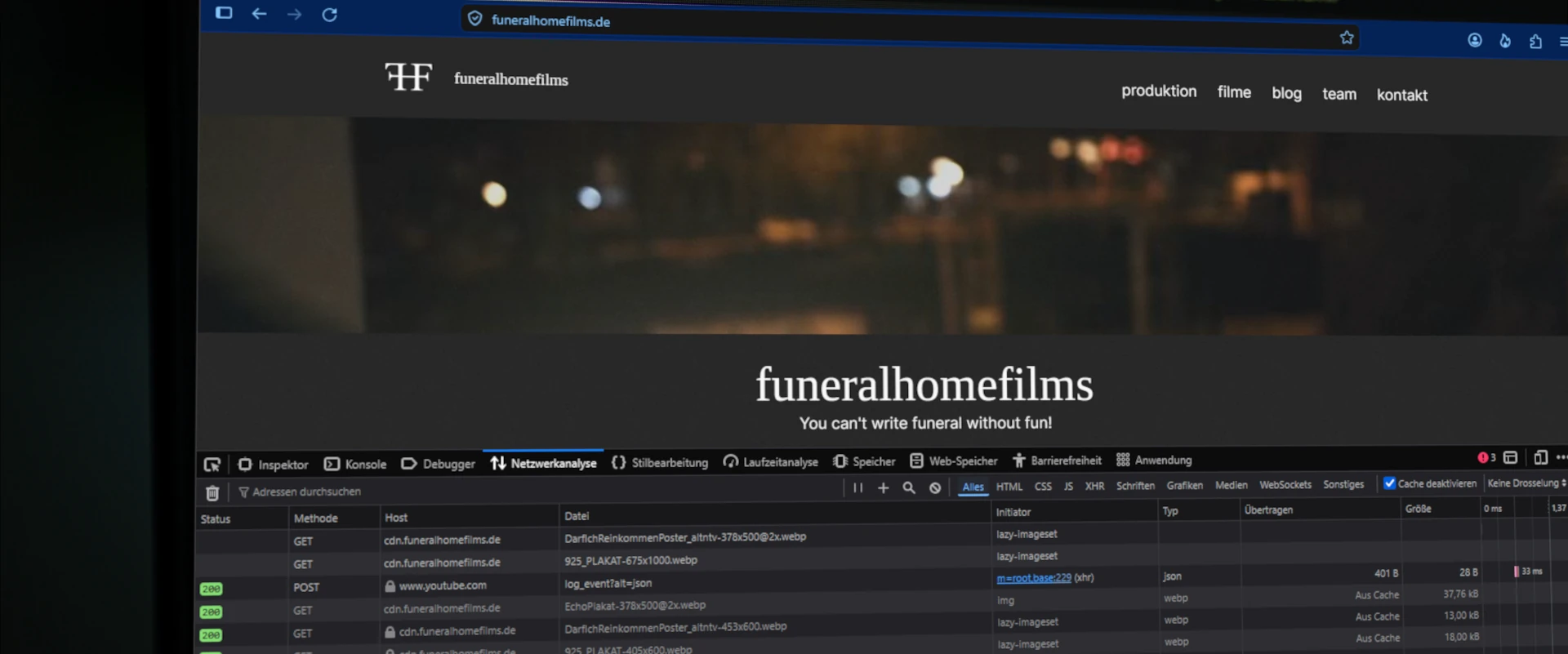 A glance at the network tab: Here, an inquiry to YouTube also goes out. If this happens with consent, it’s fine – otherwise, it’s time to investigate.
Basic Analytics
If you want to know whether someone visits your website and spends time there, the standard is Google Analytics – but this is the least comfortable way from a data protection point of view: The data flows to Google.
We use Matomo instead, self-hosted on our own servers. The data stays with us, and in a data-saving configuration (without cookies or fingerprinting, with shortened IP addresses) the operation can be justifiable without consent banners – the legal situation is in flux here, so it’s best to check or consult in doubt. However: Matomo requires some maintenance and counts visits more conservatively than Google. But this is more than enough for a portfolio.
Security
As the operator of your own website, you are responsible for securing your website and web server. Especially CMS systems offer login portals and external interfaces that need to be secured. In the worst-case scenario, your website could be hijacked and then used to damage your reputation. If your web server is hacked, it could be used for further criminal activity, and from a criminal-law perspective, that would initially be traced back to you. So, the security aspect should always be taken into account.
Securing the web server
It’s never impossible that something will be hacked. But you can do your best to minimize this risk. This process starts with hardening your server. If you have a web hosting package, this step is usually taken over by your host. On a shared server, a certain cluster risk arises. Attackers could break into another user and then find a way into your environment. Such attacks are not easy to carry out, but they can sometimes happen.
Even if your server is already hardened, you still have the responsibility for your server access data and your customer account. These should be kept safe, preferably in a local password manager. I personally use KeePassXC (keepassxc.org) and am satisfied with it. The devices where the access data is stored and used should also be trustworthy and secure.
Do you operate or rent your own server and have full root access to it, then the hardening responsibility lies with you. Online you can find many resources on how to harden a server. I recommend the following contribution from the Hetzner Community, where the basics are very well explained under Ubuntu (widely used Linux distribution): community.hetzner.com
Securing WordPress
The server is one half, the CMS the other. Attacks on the CMS are usually much easier to carry out. Generally, the following aspects should be considered:
-
Updates: Enable automatic updates. Minor versions and security patches usually run smoothly, but major updates of core, themes, and plugins can cause problems. Therefore, backups should be in place.
-
Plugin hygiene: Each plugin is foreign code with full access to your site. Therefore, less is more. Also, ensure that plugins are actively supported with updates.
-
Secure login: Strong and unique passwords, two-factor authentication, and a limited number of login attempts are the minimum. Automated bots test passwords continuously at every publicly accessible login form. If you operate multiple web services yourself, it’s worth looking into Identity-and-Access-Management Systems (IAM), which allow you to delegate login via OAuth. In this case, you can even disable the password login in WordPress.
-
Minimal rights: Don’t write posts with the administrator account. A limited-rights account for daily work limits the damage if access credentials are lost.
-
Interface awareness: REST API, XML-RPC, and AI interfaces like MCP are doors to your site. Only open the ones you actually need, and secure them.
Backups
Backups are your last line of defense; against attackers, broken updates, and your own mistakes. When doing backups, keep the following in mind:
-
Always secure both: the files (uploads, themes, plugins, configuration) and the database. One without the other is useless in an emergency.
-
Store at least one copy outside your web server. A backup that is stored on the same server as the site goes down with it. Under ideal conditions, you adhere to the 3-2-1 backup rule.
-
Test the restoration at least once. A backup that has never been restored relies on the hope that it will work.
-
Before every major update or experiments with themes and plugins: manual backup.
Conclusion
Data protection, security, and backups are not a one-time project, but ongoing maintenance. Those who plan this routine from the start – a few hours a month – have the unpleasant part of website operation under control before anything goes wrong.
And if your website doesn’t even exist yet: How to get there with a small budget is explained in Setup post: funeralhomefilms.de.